Download for WindowsDownload für WindowsDescargar para WindowsTélécharger pour WindowsTransferir para WindowsBaixar para WindowsСкачать для WindowsWindows版をダウンロード下载 Windows 版
Download for macOSDownload für macOSDescargar para macOSTélécharger pour macOSTransferir para macOSBaixar para macOSСкачать для macOSmacOS版をダウンロード下载 macOS 版
Download for Debian/UbuntuDownload für Debian/UbuntuDescargar para Debian/UbuntuTélécharger pour Debian/UbuntuTransferir para Debian/UbuntuBaixar para Debian/UbuntuСкачать для Debian/UbuntuDebian/Ubuntu版をダウンロード下载 Debian/Ubuntu 版
Download for Red Hat/FedoraDownload für Red Hat/FedoraDescargar para Red Hat/FedoraTélécharger pour Red Hat/FedoraTransferir para Red Hat/FedoraBaixar para Red Hat/FedoraСкачать для Red Hat/FedoraRed Hat/Fedora版をダウンロード下载 Red Hat/Fedora 版
Download for Arch LinuxDownload für Arch LinuxDescargar para Arch LinuxTélécharger pour Arch LinuxTransferir para Arch LinuxBaixar para Arch LinuxСкачать для Arch LinuxArch Linux版をダウンロード下载 Arch Linux 版
How to Compare Bisq Easy Offers Before Buying Bitcoin
By Mark Ellis · Bisq 2 v2.1.15 on Windows · Screenshots captured November 18, 2026
Before choosing a Bisq Easy offer, compare the payment method, amount range, actual BTC price, seller reputation and trade terms. A lower premium is only useful if you can meet the offer’s conditions. The percentage alone does not tell you whether the offer fits your purchase.
I reviewed two EUR offers in Bisq Easy: one priced 11% above market and another at 29.99%. At first glance, the cheaper choice looks obvious. Opening the details reveals an important difference: one accepts cryptocurrency payments, while the other accepts SEPA or Revolut.
This walkthrough shows what I checked before committing to anything. I viewed the offers and profiles without accepting a trade or sending payment. The screenshots record a particular moment; prices, reputation scores and availability can change. The sellers are examples, not recommendations.
1. Make sure you are looking at offers to buy from
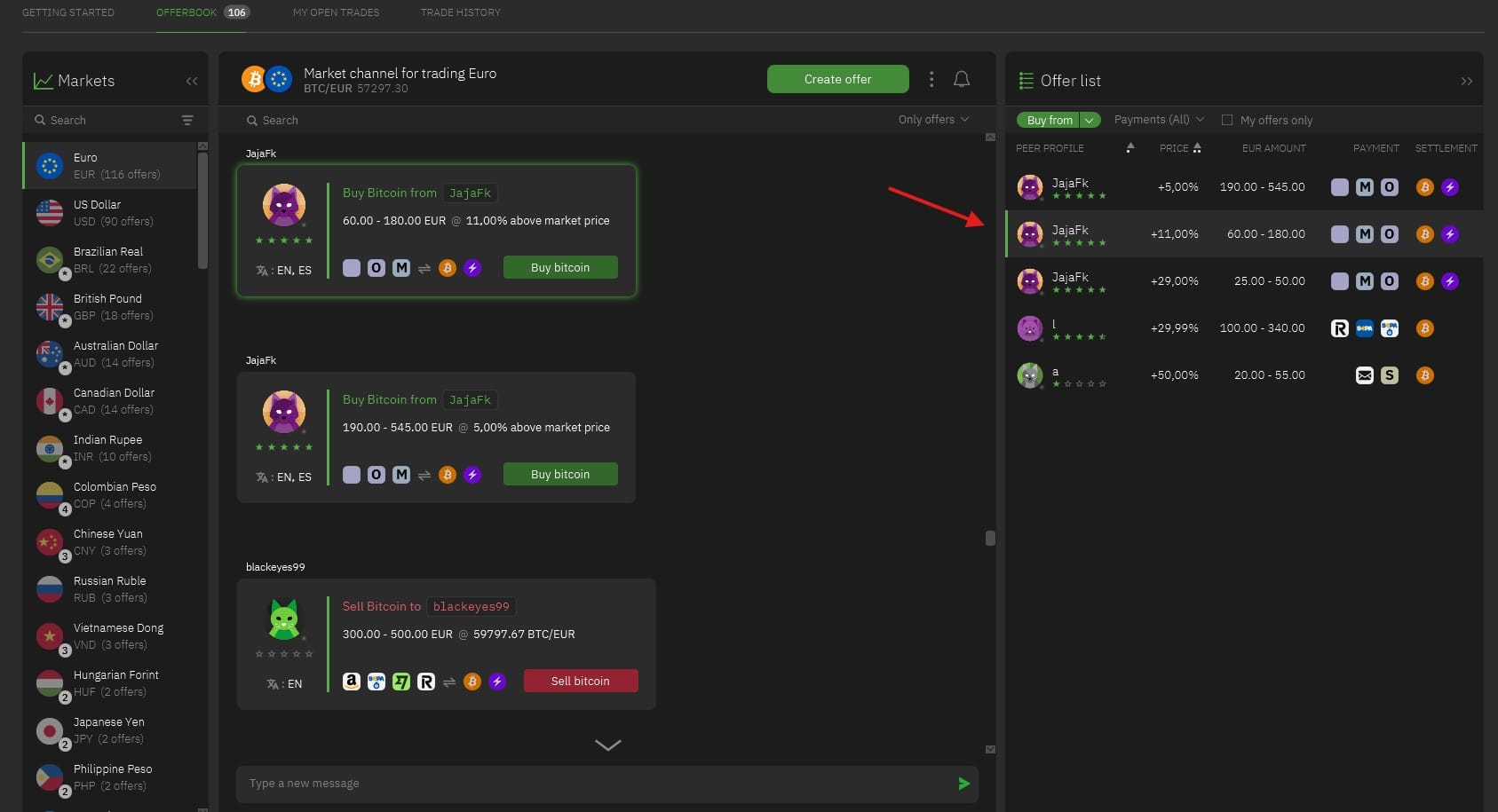
Open Bisq Easy → Offerbook, choose your currency, and expand the Offer list on the right. In this example, the list is set to Buy from. Selecting a row brings its card into view.
A green Buy bitcoin button means you would buy BTC from that seller. A red Sell bitcoin button is the opposite direction: you would supply the bitcoin. Do not compare the two as if they were both purchase offers.
The selected offer accepts purchases of €60–180 at 11% above the displayed market price. The same seller also lists a lower premium for a larger amount.
The selected seller offers €60–180 at an 11% premium. A nearby offer from the same seller shows 5%, but its minimum is €190. For a €100 purchase, that lower-premium offer is outside the available range. You do not need to raise your budget simply to reach a lower advertised percentage.
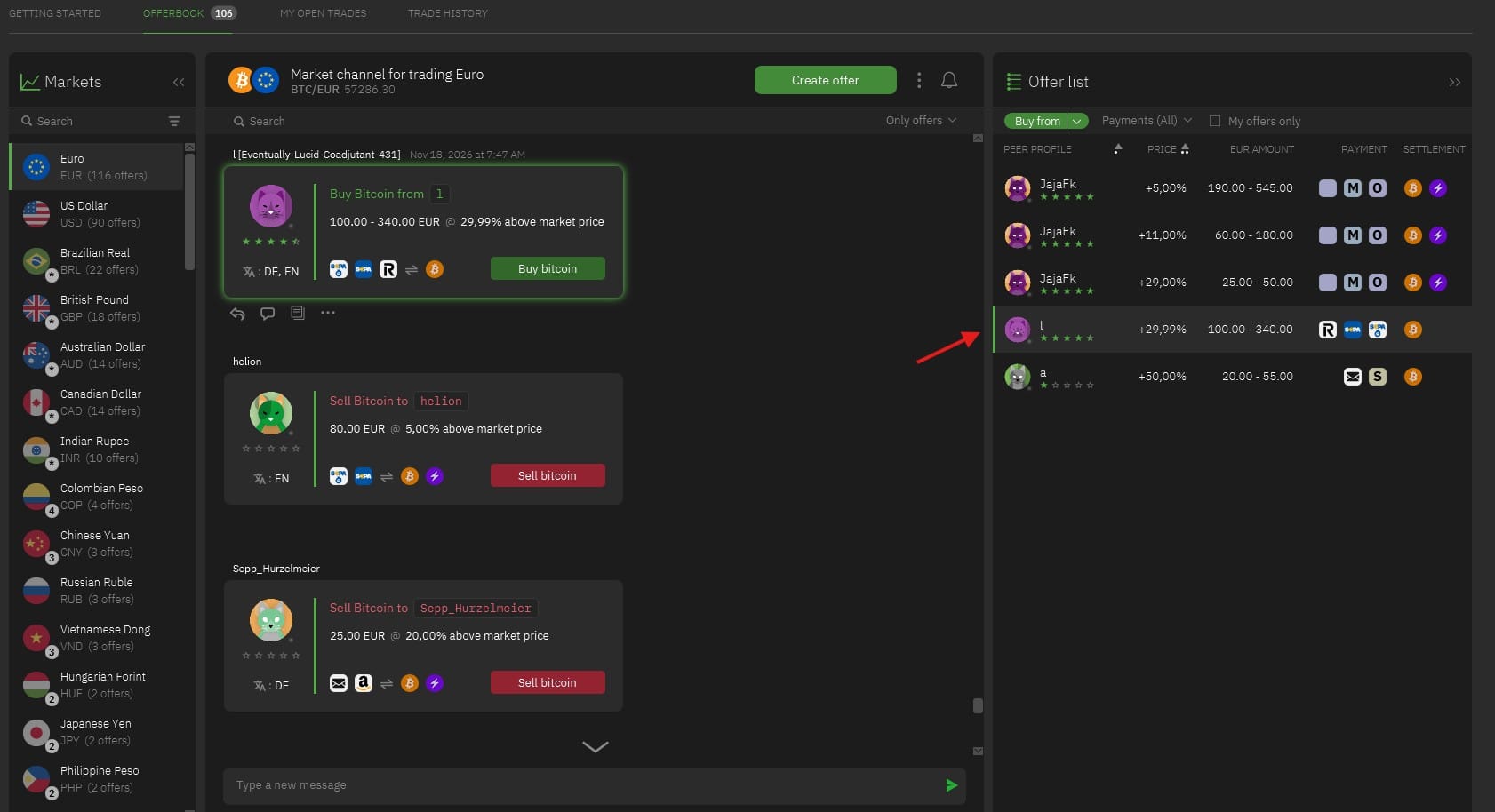
A second offer covers €100–340 at 29.99% above market. Its payment icons differ from those of the 11% offer.
2. Open the details before comparing the price
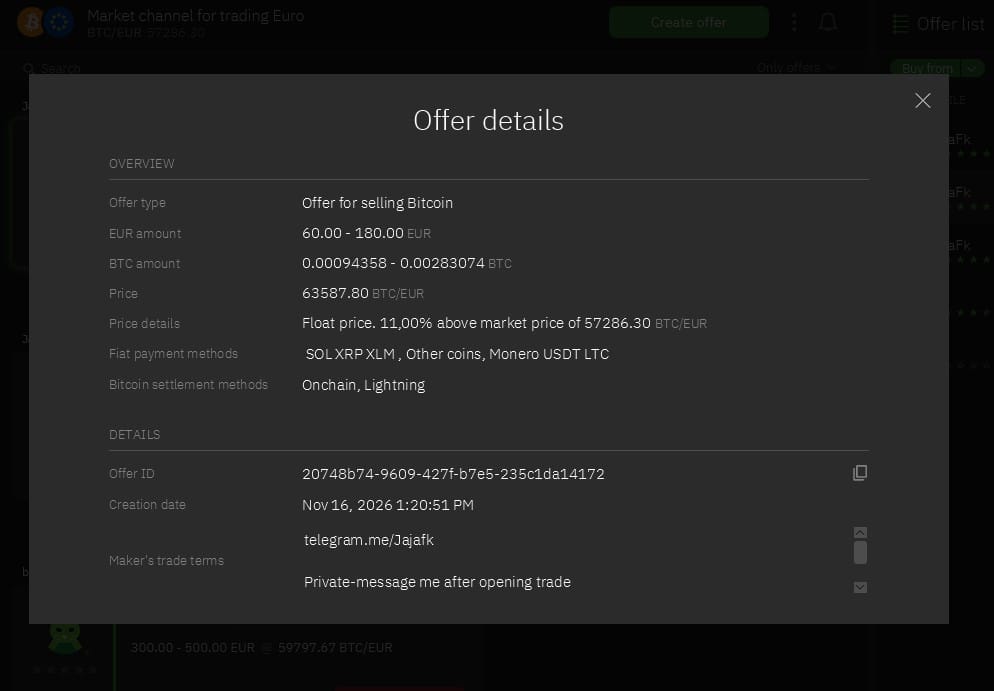
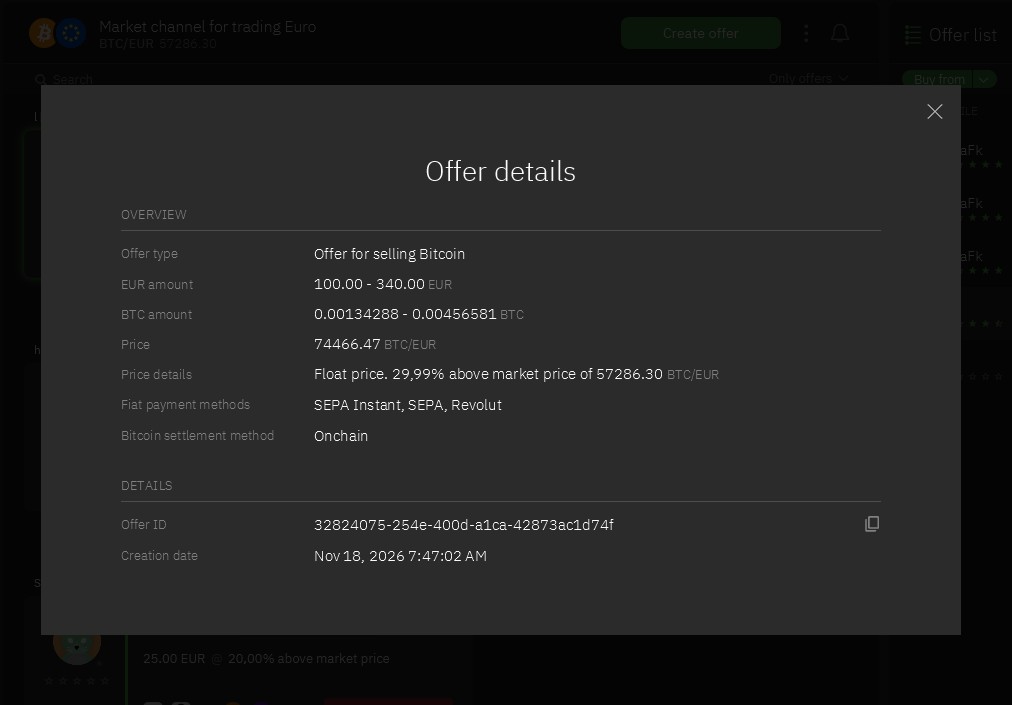
Use the document icon beneath the card to open Offer details. You can inspect these details without pressing Buy bitcoin. Check the amount range, price, price details, payment methods and Bitcoin settlement method.
The wording “Offer for selling Bitcoin” describes what the offer maker is doing. In both examples below, the maker sells BTC and you would be the buyer.
Offer A: a quoted price of €63,587.80 per BTC, cryptocurrency payment options, and Bitcoin delivery through Onchain or Lightning.Offer B: a quoted price of €74,466.47 per BTC, SEPA Instant, SEPA or Revolut payment, and Onchain Bitcoin delivery.
What I checked
Offer A
Offer B
EUR amount range
€60–180
€100–340
Premium
11%
29.99%
Quoted price per BTC
€63,587.80
€74,466.47
Payment options shown
SOL, XRP, XLM; Other coins; Monero, USDT, LTC
SEPA Instant, SEPA, Revolut
Bitcoin delivery
Onchain or Lightning
Onchain
The EUR label does not mean that both sellers accept a euro bank transfer. Offer A uses EUR to quote the trade value, but its listed payment options are cryptocurrencies. “Other coins” does not confirm that a particular asset or network is accepted. That needs to be clarified before committing to a trade.
Likewise, Onchain and Lightning describe how you receive bitcoin. They are separate from how you pay the seller. For more background, see Bisq payment methods.
3. Work out how much BTC your budget buys
A premium is the seller’s price above the market reference shown in the application. It is different from a separately charged trading fee. Even when an application advertises no trading fee, an offer can still cost more than the displayed market rate. See the guide to Bisq trading costs for the distinction.
Both detail screenshots use the same market reference: €57,286.30 per BTC. This lets us illustrate the difference without comparing unrelated market snapshots.
Estimated BTC = payment value ÷ quoted price per BTC
At the captured prices, €100 of value would buy approximately 0.00157263 BTC with Offer A, or 0.00134289 BTC with Offer B.
These calculations use the displayed, rounded prices. They exclude any payment-provider charges, cryptocurrency conversion costs and transfer costs associated with making the payment. The actual BTC amount displayed when reviewing a trade takes precedence over this example.
For Offer A, €100 is the value being compared, not confirmation that you can send €100 from a bank. If you first have to acquire or transfer another coin, account for that extra step. A cheaper BTC quote does not automatically produce a cheaper usable route.
Both offers use a floating price. The amounts in this article are historical examples, not current quotes. Recheck the actual price and BTC amount before accepting any offer.
4. Look beyond the stars on the seller’s profile
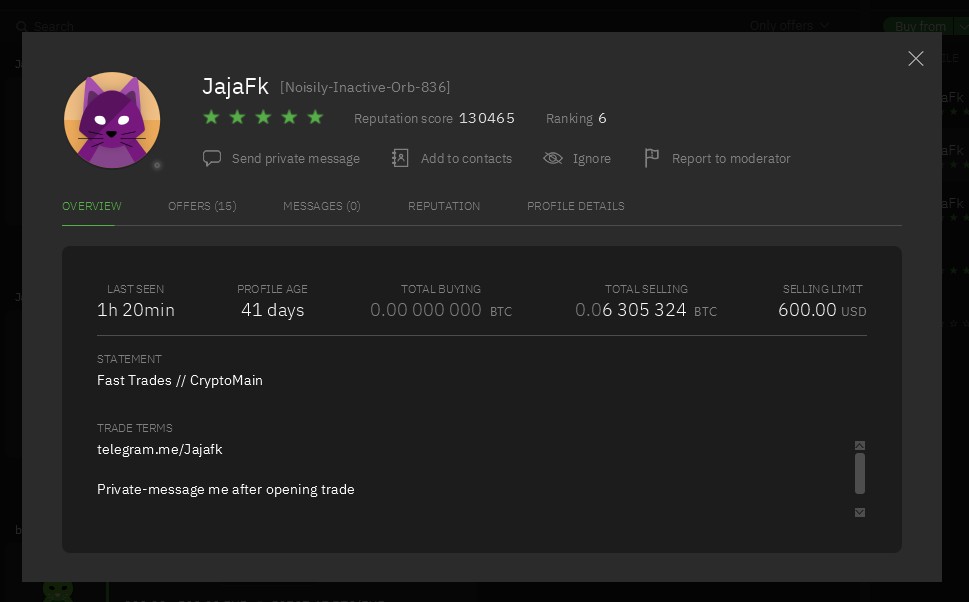
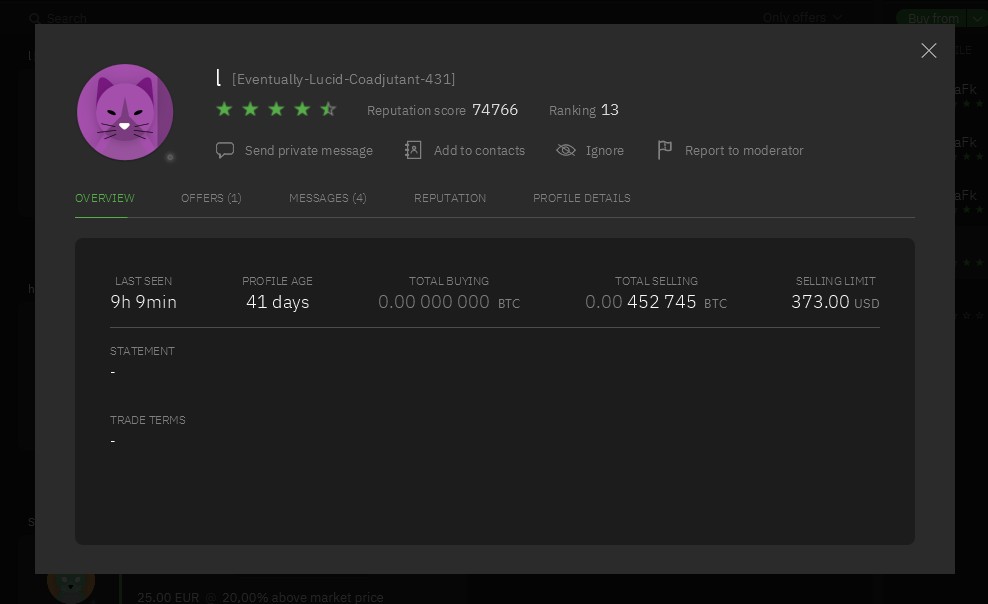
Open the seller’s avatar or name. The Overview tab provides context such as profile age, reputation score, last-seen information and trade terms. In my screenshots, both profiles are 41 days old, but their scores and reputation histories differ.
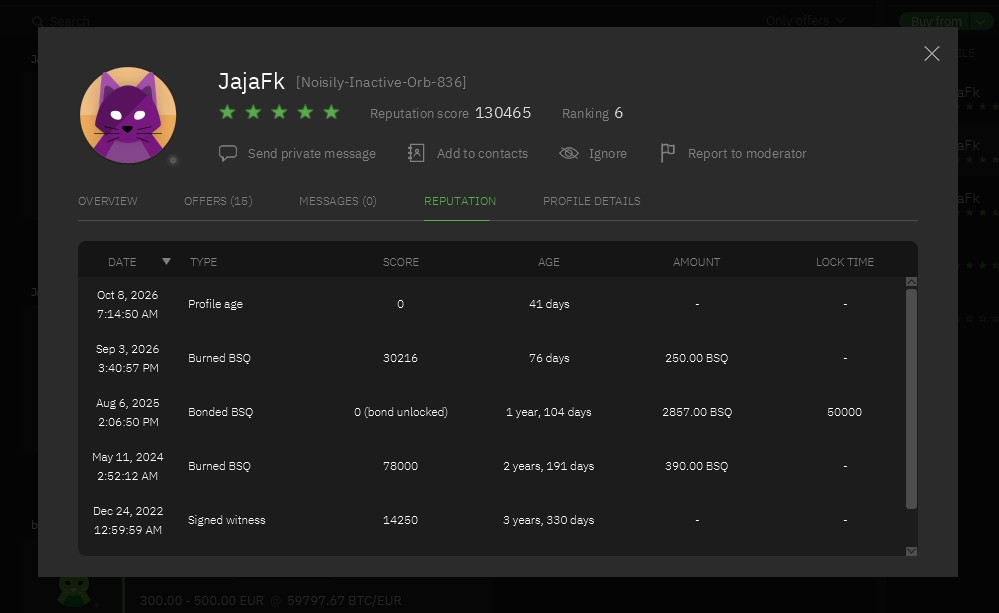
Seller A’s overview shows a reputation score of 130,465 and a profile age of 41 days at the time of capture. These are profile details, not a personal endorsement.The Reputation tab shows the sources behind the score, including Burned BSQ and Signed witness. The visible Bonded BSQ entry contributes zero and is marked “bond unlocked”.
The Reputation tab is more informative than counting stars alone. Seller A’s visible entries include Burned BSQ and Signed witness. An older Bonded BSQ entry is marked “bond unlocked” and contributes zero. Do not count the bond amount as currently active backing when the screen says it is unlocked.
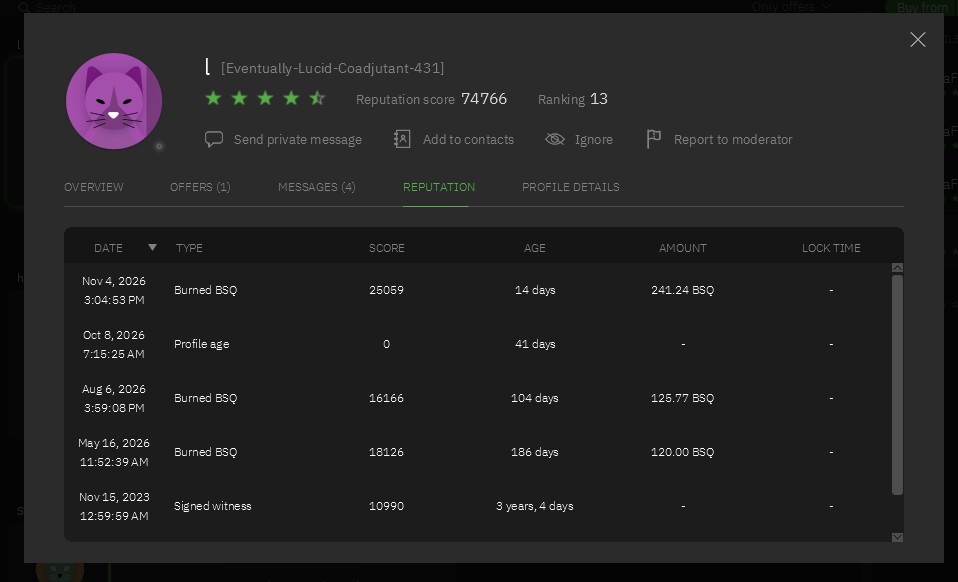
Seller B’s overview shows a score of 74,766. The visible statement and trade-terms fields contain no additional instructions.Seller B also has several reputation sources. Their ages differ from the current profile age; these dates should not be read as the age of this profile.
Seller B’s visible entries also include Burned BSQ and Signed witness. The screenshot does not establish why this seller chose a higher premium. Nor does the presence of a reputation score guarantee a successful trade.
These stars are not a conventional collection of customer reviews. For the meaning of the reputation sources and current rules, consult the Bisq reputation documentation. A dated reputation entry is also not proof that the current profile has existed since that date.
5. Read the terms and resolve missing details
Offer A’s visible terms include an external Telegram contact and a request for a private message after opening a trade. I recorded those terms; I did not contact the seller or test that process. A contact link in a screenshot is not an endorsement or a reason to move your trade outside Bisq. Keep the agreed terms and relevant payment discussion recorded in the Bisq trade chat.
Offer B’s profile has no additional instructions in its visible trade-terms field. An empty field does not mean that every payment arrangement is accepted. You still need to understand the offer and the agreed payment details.
Before committing, check that you can use the stated payment method, understand the total amount, and have a compatible way to receive BTC. If paying with cryptocurrency, clarify the exact asset, network, valuation and transfer costs. Never infer those details from a small payment icon.
My checklist before choosing an offer
Direction: am I buying BTC, rather than selling it?
Budget: does my amount fit the offer’s range?
Payment: can I actually use an accepted method?
Price: how much BTC will I receive after accounting for my payment costs?
Reputation: what sources support the score, and what does the profile show?
Terms: is anything unclear or unsuitable before I commit?
For this example, the two offers are useful for understanding the interface, but they are not interchangeable. If neither fits your payment method and budget, choosing neither is a reasonable outcome.
Questions about comparing Bisq Easy offers
Does the lowest premium mean the best offer?
No. Compare offers that you can actually use. A low percentage may apply to a larger minimum amount or a different payment method. Reputation, terms and total payment costs also matter.
Why does a EUR offer list cryptocurrency payments?
EUR can be the reference currency for the trade value while the seller accepts payment in another asset. Read the payment-method field and clarify the exact arrangement; the currency heading alone is not enough.
Are the stars reviews from previous buyers?
The reputation screen shown here lists sources such as Burned BSQ and Signed witness. Treat the stars as a display of the reputation system, not as ordinary buyer-review stars.
Can I inspect an offer without starting a trade?
Yes. I used the offer list, detail window and seller profiles for this walkthrough without accepting a trade. Viewing these screens is different from confirming a purchase.
Need help choosing the right Bisq application first?