Download for WindowsDownload für WindowsDescargar para WindowsTélécharger pour WindowsTransferir para WindowsBaixar para WindowsСкачать для WindowsWindows版をダウンロード下载 Windows 版
Download for macOSDownload für macOSDescargar para macOSTélécharger pour macOSTransferir para macOSBaixar para macOSСкачать для macOSmacOS版をダウンロード下载 macOS 版
Download for Debian/UbuntuDownload für Debian/UbuntuDescargar para Debian/UbuntuTélécharger pour Debian/UbuntuTransferir para Debian/UbuntuBaixar para Debian/UbuntuСкачать для Debian/UbuntuDebian/Ubuntu版をダウンロード下载 Debian/Ubuntu 版
Download for Red Hat/FedoraDownload für Red Hat/FedoraDescargar para Red Hat/FedoraTélécharger pour Red Hat/FedoraTransferir para Red Hat/FedoraBaixar para Red Hat/FedoraСкачать для Red Hat/FedoraRed Hat/Fedora版をダウンロード下载 Red Hat/Fedora 版
Download for Arch LinuxDownload für Arch LinuxDescargar para Arch LinuxTélécharger pour Arch LinuxTransferir para Arch LinuxBaixar para Arch LinuxСкачать для Arch LinuxArch Linux版をダウンロード下载 Arch Linux 版
By Mark Ellis · Checked November 20, 2026 · Screenshots: Bisq 2 v2.1.15 on Windows
Where your bitcoin arrives depends on which Bisq application you use. In Bisq Easy, you provide a compatible receiving address or Lightning invoice for the seller to pay. Bisq 1 uses its own wallet and trade process, with an option to withdraw to an external wallet after completion.
Check the application and Bitcoin delivery method before choosing an offer. A bank account or an account on bisq.info is not where your BTC will arrive.
After finding an offer, a practical question remains: where will the bitcoin actually go? The words Onchain and Lightning can make this less obvious, especially if you have only installed Bisq and have not prepared a receiving wallet.
I reviewed the offer card and details shown below. These are my screenshots of the available delivery methods, not a completed purchase. I did not accept this offer, send payment or test a wallet transfer for this article. The receiving steps below explain what to prepare; individual wallet screens differ.
Bisq 1 and Bisq Easy handle receiving differently
Application
Where to look for your BTC
What to prepare
Bisq 1
The application’s trade-completion and wallet screens. Completed funds can be kept in the Bisq wallet or withdrawn externally.
A receiving Bitcoin address if you intend to withdraw to a separate wallet.
Bisq Easy: Onchain
The Bitcoin wallet controlling the receiving address you provided for the trade.
A Bitcoin mainnet receiving address.
Bisq Easy: Lightning
The Lightning wallet that generated the invoice you provided.
A compatible Lightning wallet and a valid invoice for the agreed BTC amount.
Do not follow a Bisq 1 withdrawal tutorial while expecting the same screens in Bisq Easy. If you are unsure which application you need, start with the getting-started guide.
Read the Bitcoin delivery options before accepting an offer
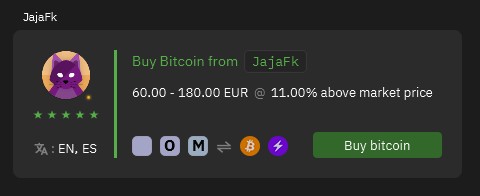
In the screenshot below, the green Buy bitcoin card shows both an orange Bitcoin symbol and a purple Lightning symbol. They represent the ways this seller offers to deliver BTC. They do not tell you how to pay the seller.
The orange Bitcoin icon and purple Lightning icon identify the available Bitcoin delivery methods. The other icons describe how the buyer can pay the seller.
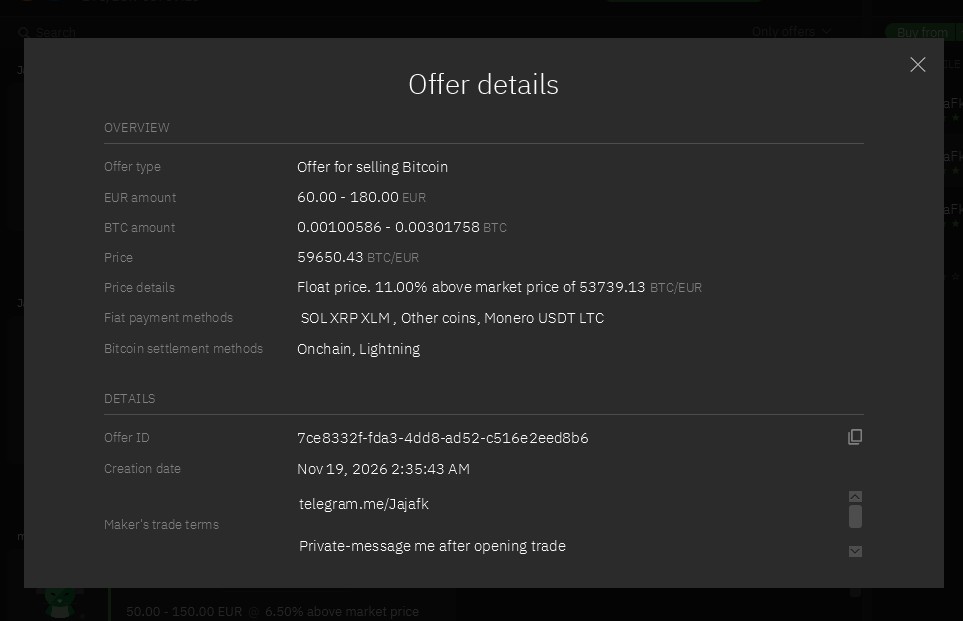
Open Offer details using the document icon beneath the card. Find Bitcoin settlement methods. In this example, it reads Onchain, Lightning.
The Bitcoin settlement methods field lists Onchain and Lightning. The payment methods above it are a separate part of the offer.
The payment-method field above it lists cryptocurrencies. Although the trade value is quoted in EUR, this particular offer does not list a euro bank transfer. Buying with cryptocurrency and receiving through Lightning are two separate choices. For a fuller explanation, see how to compare Bisq Easy offers.
This screenshot records availability on November 20, 2026. The seller’s price and terms are examples, not a recommendation. Confirm the selected delivery method in the trade review rather than assuming both methods will be used.
If you choose Onchain
Onchain means that the bitcoin is sent in a transaction on the Bitcoin network. Prepare a wallet that can receive Bitcoin on mainnet before committing to a purchase.
Open the Bitcoin account in your receiving wallet and choose Receive.
Generate or select a receiving address. Make sure this is Bitcoin mainnet, not another asset or network.
Verify the address in your wallet. With a hardware wallet, follow its instructions to check the address on the device display.
Provide the verified address through the Bisq trade’s receiving-details workflow when requested. Check the pasted address again.
After the seller sends the BTC, check your receiving wallet for the transaction and its confirmation status.
If your wallet does not provide a compatible Bitcoin receiving address, resolve that before starting. A BNB, Ethereum or wrapped-bitcoin token address is not a substitute for a Bitcoin mainnet address.
For an example of address verification on a hardware wallet, see Trezor’s receiving instructions. This illustrates the check; you do not need to buy that brand to use Bisq.
If you choose Lightning
Lightning is another way to receive BTC, but an ordinary onchain receiving address is not the same as a Lightning invoice. Your wallet must support receiving through Lightning.
Check your wallet’s receiving limits, fees and requirements before choosing the offer.
When the trade asks for it, create a Lightning invoice for the agreed BTC amount. Check whether your wallet displays BTC or satoshis.
Check the invoice amount and expiry before providing it through the Bisq trade workflow.
After the seller pays it, verify the received payment in the wallet that created the invoice.
A standard Lightning invoice is a payment request with its own details, including an expiry. Do not substitute an email-like Lightning address unless the application explicitly supports that format. If an invoice expires, first establish whether it was already paid; do not create uncertainty by repeatedly sending different requests.
Some wallets have additional receiving requirements or service charges. These can affect what reaches your usable balance. Check the wallet’s own documentation rather than assuming Lightning receiving is always free or available for any amount.
Both methods involve bitcoin. A separate token called “Lightning BTC” is not something you need to purchase for this process.
Can I receive directly to a hardware wallet?
For an onchain Bisq Easy purchase, the receiving destination can be a Bitcoin address controlled by your hardware wallet. You provide the verified address, not the device’s recovery phrase. This does not require importing your private keys into Bisq.
A normal Bitcoin receive screen on a hardware wallet does not, by itself, provide a Lightning invoice. If you choose Lightning, use a setup that explicitly supports receiving that way. Do not assume that a hardware-wallet brand or a Bitcoin logo means every delivery method is supported.
For Bisq 1, the official trade-completion instructions describe keeping completed funds in the Bisq wallet or using Withdraw to External Wallet. An external withdrawal is not the same as asking the seller to skip the trade’s settlement process. Check the withdrawal amount, destination and fee before approving it.
How to check whether the bitcoin arrived
For Onchain
Look in your own receiving wallet. Compare the destination and BTC amount with the agreed trade, and check the transaction status. A seller’s message or screenshot is not a replacement for checking your wallet.
A pending transaction is different from a confirmed transaction. Confirmation time varies with block production and the fee paid; “about ten minutes” is not a delivery guarantee. Follow the application’s completion instructions and the confirmation requirements relevant to your transaction.
For Lightning
Check the incoming-payment history and invoice status in your Lightning wallet. Verify that the invoice was paid for the expected amount. A settled Lightning payment does not use the same confirmation counter as an ordinary onchain receipt.
If anything is unclear, keep the trade discussion in Bisq and use the relevant support process. Do not confirm receipt merely because the other person says they sent it.
If you have only installed Bisq
You can inspect offers without accepting one, as I did for these screenshots. Before buying through Bisq Easy, prepare the compatible wallet you intend to receive into and understand how to access and back it up. No purchase is needed just to learn which delivery methods an offer supports.
The receiving address or invoice is information you can share for a payment. Your seed phrase, private keys, wallet password and remote access to your device are not required by the seller. Do not use a recovery phrase as a way to “connect” a wallet to a trade.
Before you accept: know which application you are using, which Bitcoin delivery method is selected, where the receiving details come from, and where you will verify the payment. Sorting this out beforehand is easier than changing the arrangement during a live trade.
Common questions
Will the bitcoin appear on bisq.info?
No. This website provides guides. It is not a wallet or a trading account. The receiving destination depends on your application and the address or invoice used in the trade.
Do I need BTC already in the receiving wallet?
A Bitcoin onchain address can receive without an existing BTC balance. A Lightning wallet may have separate setup or receiving requirements. Neither point changes the different funding requirements of Bisq 1 and Bisq Easy.
Can I choose Onchain if my wallet does not support Lightning?
Choose an offer and trade configuration that support Onchain, and provide a compatible Bitcoin address. Do not accept a Lightning-only arrangement on the assumption that it can be changed afterward.
Why is there no receive-address field in Offer details?
Offer details describes the offer. Viewing it does not start a trade or assign a receiving destination. Your address or invoice belongs to the relevant trade workflow, not the public offer card.
Does EUR in the offer mean my bank receives BTC?
No. EUR is the price reference in this example. How you pay the seller and how you receive bitcoin are separate parts of the trade. A bank-transfer payment does not turn your bank account into a Bitcoin wallet.
Should I share my seed phrase to receive BTC?
No. Use the verified receiving address or the required invoice. Your recovery information controls access to your wallet and must remain private.